
Evident webhooks enable the Identity Assurance Platform to send automated messages to your system about changes in status of verification requests. They are an architectural alternative to polling to help simplify and scale your integration. Webhooks can be configured to notify your backend system on a range of changes to the state of a verification request.
Webhook Options for Verification Request Status Change:
- Request Activity - Submission Complete
- Your end user has completed entry of inputs to the intake form
- Request Activity - Request Complete
- The verification request is complete and results of the requested attributes can be retrieved
- Request Activity - Request Timeout
-
The verification request is in a timed out (terminal) state. This can happen for two reasons
-
Exceeded response time - Requests have a max age they can exist without required inputs provided by your end user before they timeout. By default this is 30 days but can be adjusted for your account as needed.
- Verification can not be completed - In cases where we require inputs from your end users but the documents or inputs provided cannot be processed or are no the correct document we perform one attempt to collect the correct documents. If they fail to respond or do not respond with the correct document the second time the verification will be timed out.
-
-
- Notification Failure
- Delivery of the email to your end user to complete the verification request failed.
How to configure a webhook:
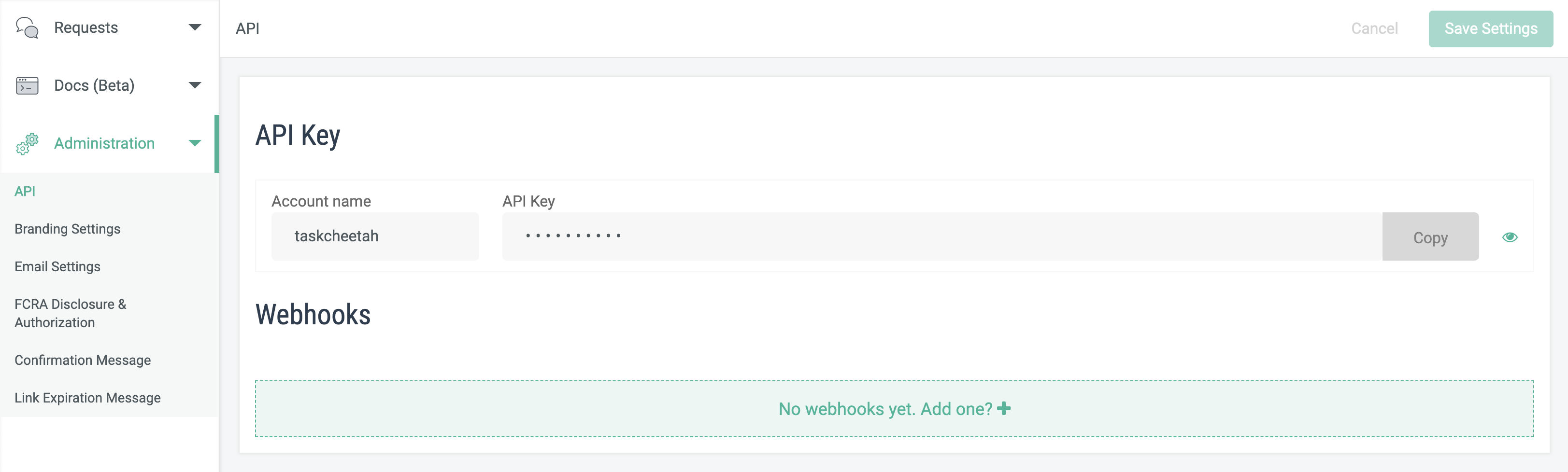
- In your admin portal left navigation bar select Administration then API. Webhooks will be configurable in the bottom section of the configuration pane.
- Click on the "No Webhooks yet. Add one? +" box
- Add as many webhooks as you need

API documentation on webhook behavior: