
Note: If you have never created a policy before, first read this article. If you do not know what a policy is, read this article.
This article outlines the fifth and sixth step of Policy Configuration, creating an offense group and defining the criterion of this offense group that will trigger a policy violation.
How does policy configuration work?
Configuring your policy consists of six (6) distinct steps. Five (5) of these steps are required and the final step is optional. When you are creating a policy for the first time, you will need to complete the steps in the consecutive order they are listed below.
- Step 1: Name the policy
- Step 2: Configure the elements of a background check
- Step 3: Select the background check product associated with this policy.*
- Step 4: Create the first offense group of the policy & define the criteria that will result in a policy violation.
- Step 5: Identify which crimes will belong to this offense group (that's the step this article is about).
- Step 6: (Optional) Create additional offense groups to allow further configuration of the policy (This article is also about this step.)
*Once you have created the policy, you may go back and edit the policy in whatever order you wish. However, the background check type cannot be changed after creation of the policy. Therefore, if you want to run a different background check type after the policy has already been created, you will need to configure a new policy.
If you are returning to edit an offense group after already saving it, first click the edit button and then click "Next."

If you just finished creating the first offense group of the policy, and defining the criteria that will result in a policy violation for this offense group, you will need to select the crimes that will be included in the first offense group.
To do so, click the "Next" button.

You will be taken to a page where you will be presented with the conditions you set for the Offense Groups along the top.

In addition, you will be presented with a list of approximately 60 crimes categories, some of which may be pre-selected by default. This list of crime categories aligns with the National Incident Based Reporting System (NIBRS) developed and implemented by the FBI.
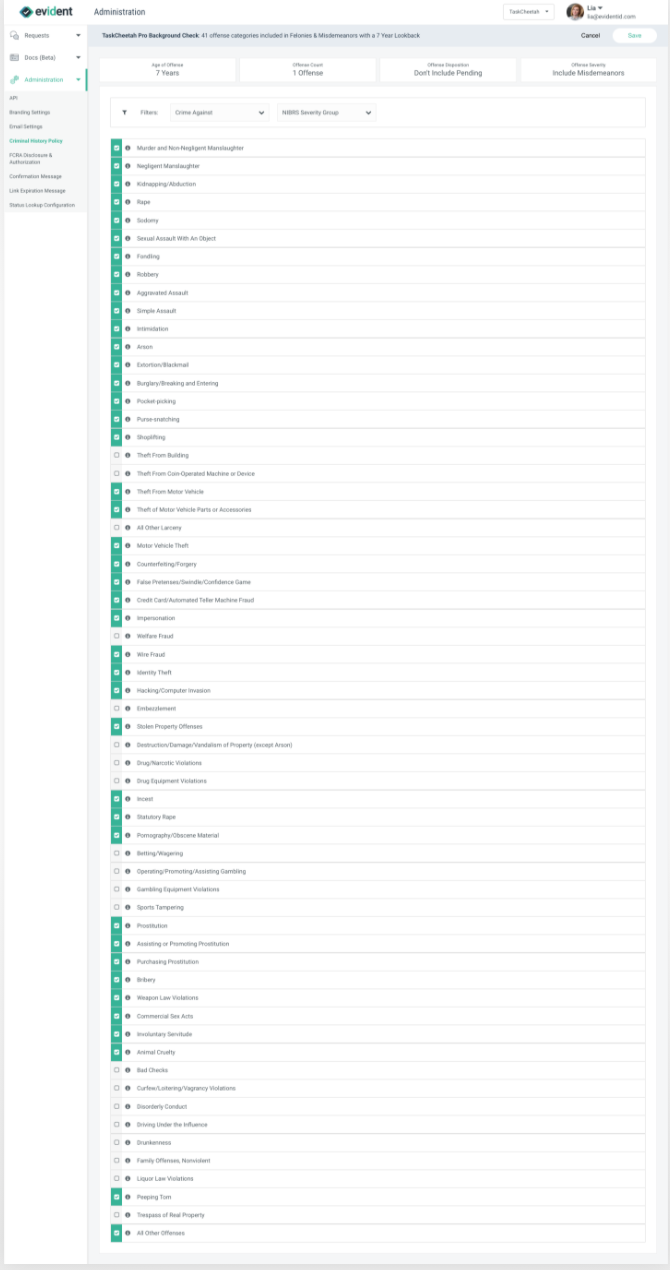
Because the list of crimes aligns with NIBRS, the majority of the elements of the crime category selection screen are best understood by leveraging the 2019.2 NIBRS User Manual which is attached to the bottom of this article.
NIBRS Offense Codes
The list of crimes are organized they their associated NIBRS Offense Code.
The 2019.2 User Manual outlines Offense Codes in Section 2.2 Classifying Offenses under The Use of Offense Codes in NIBRS:
"In NIBRS, there are 84 three-digit UCR offense codes; one for each of the 71 Group A and 13 Group B offenses. The three-digit data values are used to identify the Group A and Group B offenses in an incident to submit NIBRS Group A Incident Reports and Group B Arrest Reports."
Filtering
Additionally, the crime categories on the crime category selection screen may be filtered by either the associated "Crimes Against" category or the NIBRS Severity Group.

Crimes Against Category

You may filter crimes by the "Crimes Against" category as highlighted in the above screenshot.
The 2019.2 NIBRS User Manual outlines the "Crimes Against" offense categories in Section 2.2 Classifying Offenses, on p. 8-9:
"Each NIBRS offense belongs in one of three categories: Crimes Against Persons, Crimes Against Property, and Crimes Against Society. Crimes Against Persons, e.g., Murder, Rape, and Assault, are those offenses whose victims are always individuals. The object of Crimes Against Property, e.g., Robbery, Bribery, and Burglary, is to obtain money, property, or some other benefit. Crimes Against Society, e.g., Animal Cruelty, Drug Violations, Gambling, and Prostitution, represent society’s prohibition against engaging in certain types of activity."
NIBRS Severity Group
You may filter the crime categories by their NIBRS Severity Group, as highlighted in the below screenshot.
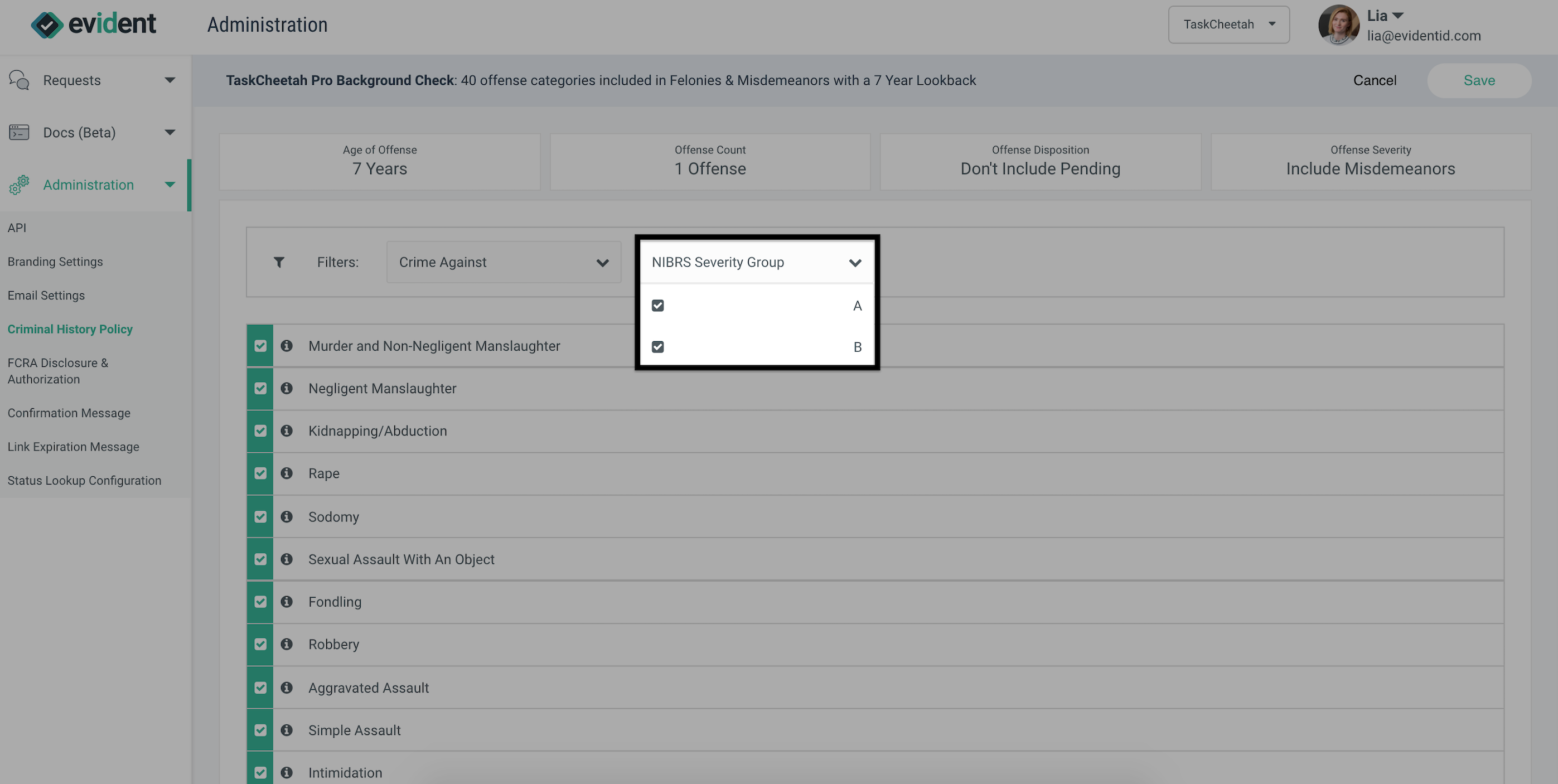
The 2019.2 NIBRS User Manual outlines crime severity in Section 2.2 Classifying Offenses, on p. 7-8, under Criteria for Distinguishing Between Group A and Group B Offenses:
"When reporting data to the FBI’s UCR Program via NIBRS, LEAs must also classify the offenses within an incident as Group A offenses or Group B offenses. Though some state and local RMSs require the same level of reporting for all offenses, NIBRS requires differing levels of detail in reporting Group A and Group B offenses. LEAs must report both incidents and arrests for Group A offenses, and they must report only arrests for Group B offenses. The Group A offenses are the more serious crimes such as Murder, Rape, Robbery, etc. Group B offenses tend to be minor in nature, such as Curfew/Loitering/Vagrancy Violations, Disorderly Conduct, Driving Under the Influence, etc. See the listing of Group A and Group B offenses in Section 2.3 Group A and Group B offense listing."
Crime Classification
It is recommended that any questions about what different crime categories mean or crime classification are answered by referencing the 2019.2 NIBRS User Manual.
Evident recommends reviewing Sections 2.3-2.5 for these kinds of questions.
- Section 2.3: Group A and Group B Offense Listing, starting on p. 10 and extending through p 15
- Section 2.4 Offense Definitions, starting on p. 15 and extending through p. 44
- Section 2.5: Offense Lookup Table, starting on on p.45 and extending through p. 64
When you have selected all the crimes you wish to include in this Offense Group, click the "Save" button.

You will be taken back to the Criminal History UI Policy Edit homepage.

Wrapping Up
Now Step 5 of the policy creation is complete. From this page you may edit the existing offense group if you'd like to make a change prior to running the background check.

You may also proceed to the final (and optional) Step 6 of policy creation, which is to create additional offense groups to allow further configuration of the policy. Step 6 is simply a repetition of Step 5 as many times as you would like, although you should consider how multiple offense groups may override one another, depending on their selected crimes and the associated Offense Conditions.

Alternatively, you may also create a new policy.

2019.2 NIBRS User Manual